Monday, August 18, 2014

Google Apps: Slides

Last week I shared my love for all things Google and focused primarily on Google Forms.  This week to continue our Google Apps focus, we're focusing on Google Slides.  If you are a Power Point friend, Google Slides will be an easy transition.

Just like last week, we are going to start by signing into Google. Once you've done that, click on the 3x3 tiles..
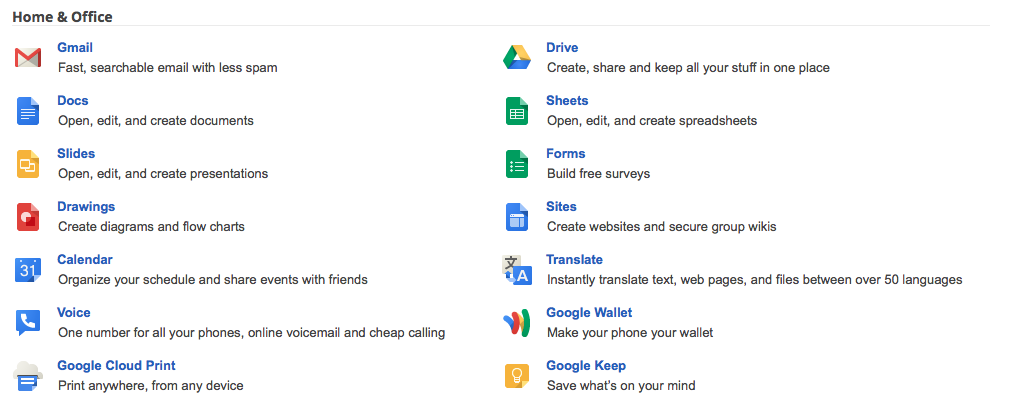
Depending on how often you use Google Apps, your menu may look different than mine.  I had to click on "Even more from Google" to get to Google Slides.

Once you have entered the main page of Google, scroll down to the Home/Office section and click "Slides."

You'll then be presented with the start screen.  You will see previously created Slides presentations or those that were shared with you.  Continue to work on these, or click the + on the bottom right to create a new presentation.

Next choose a theme.  These are pretty basic, but you do have the option to import a theme. This can be a Power Point presentation theme that you have used.  Just save it as blank slides. 

Once you have chosen your theme, the screen looks very similar to Power Point.  


  1. This button will take you directly back to the start screen.
  2. Click here to name your presentation.
  3. Click the + sign to add slides.
  4. If you want to add comments to a presentation that you have created or one that has been shared, do so by clicking here.
The rest is pretty self explanatory.  

Background allows you to change the colors of backgrounds. Layout lets you choose different organization templates for your slides, and transition is where you go to change how one slide changes to another.  

I love Google Slides! It's pretty easy to start and finish a simple presentation in a short amount of time, making it perfect for classroom use.  I like that there aren't a ton of options that students would get bogged down with and lose focus.  My favorite feature is the automatic saving.  How many times have we all had those students who forget to save their work and then lose it all?! 

Happy First Day to School!  We start tomorrow with kiddos!  Looking forward to seeing how you use Google Slides this year!

Who Am I?

It's 5:30 am on a Monday and I'm sitting here getting a blog post together today because I know that I'll forget it if I don't.  Blog Hoppin' is hosting Teacher's Week this week.  This week is my favorite because I get to learn so much about my blog friends.  Isn't it amazing the community that has been created with so many people we haven't met face to face?! I love it!


I feel like most of you already know many of the things I would normally share, so I had to dig a little deeper here. For those of you who are fairly new...

My name is Shasta Looper and this year I am teaching 5th grade in South Carolina. This is my 15th year of teaching.  Whew!  It seems like it was just yesterday that I entered into a portable building at Puget Sound Christian School with a group of 19 2nd/3rd graders.  Those babies graduated a few years back.  If I only knew then what I know now....

A couple of years back I had the privilege to play host to Ron Clark for a day when he came to my district.  It was an amazing time and I feel so lucky for having one on one time with him.  I've followed him for years - before he started the Ron Clark Academy and just as he was winning Disney Teacher of the Year.  This will always be one of my favorite teacher memories.


I've been married to my husband, Cheney, for a little over 16 years.  We met in Alaska in 1996 and wrote letters for about 9 months.  We had one date and were engaged the next day.  So, we are a testament to the long distance relationship.  We have not been blessed with biological children, but have one little furry child, Taku, our Russell Terrier.


Here are a few fun facts about me...


Make sure you visit Blog Hoppin' to meet everyone else!  Have a great Monday!

Tuesday, August 12, 2014

Google Forms

Google Forms is one of my favorite tools in Google.  It has made my life so much easier and allows me to collect data quickly!  I've used Forms to collect lunch information for field trips instead of sending home paper forms, feedback on classroom assignments, classroom surveys, short formative assessments, to gather supplies for class parties, and much more.  It truly is a sweet little tool that is easy to use.

What I like most:
1.  You can knock out a form in a brief amount of time.  If you have worked with Promethean software or Smart, Edmodo, etc. then you already have the skill set needed to create forms in Google.

2. Data is collected in Google and stored for you in a nice little spreadsheet.  Once all data is collected, you can access the data in a spreadsheet form.  This came in handy when I was doing lunch counts for field trips.  All I did was print the spread sheet out and give to our cafeteria manager.

3. Easily embeddable into websites.  If you use Google Sites, forms are easily embeddable into your website.

4.  Saving.  Google saves all forms so you can go back and access them easily for the next  class or next year.


Once you sign into Google, on the top right of the screen you will see a little 3x3 icon.  If you click that, you will find your app choices in a drop down menu.  You will notice in this screen that Forms isn't showing.  You have two options here: 1. Click more to see all of the app choices and find forms on a separate screen, or 2: Click "Drive."  (That's what I did)


Once you click Drive you will arrive at this menu.  This is your home screen in Google Drive.  You can see that I have folders set up for different documents.  On the right hand side you can see current activity.  This will show what is going on with documents that you are sharing with others as well.  To start a new form, just click "Create."


Once you click "Create" you will get a drop down menu with options.  We are working with Forms, so click "Forms."


As soon as you click "Forms" you are given options about the appearance of your form.  I use these when I'm working on holiday events or placing things on my website and want them to look better than the default setting.  Choose your background and name your form here. 


Once you have chosen your background and named the form, you are taking the screen that allows you to create your questions.  It looks very similar to Edmodo and ActivInspire.  


There are many options for question type.  Depending on your purpose some work better than others.


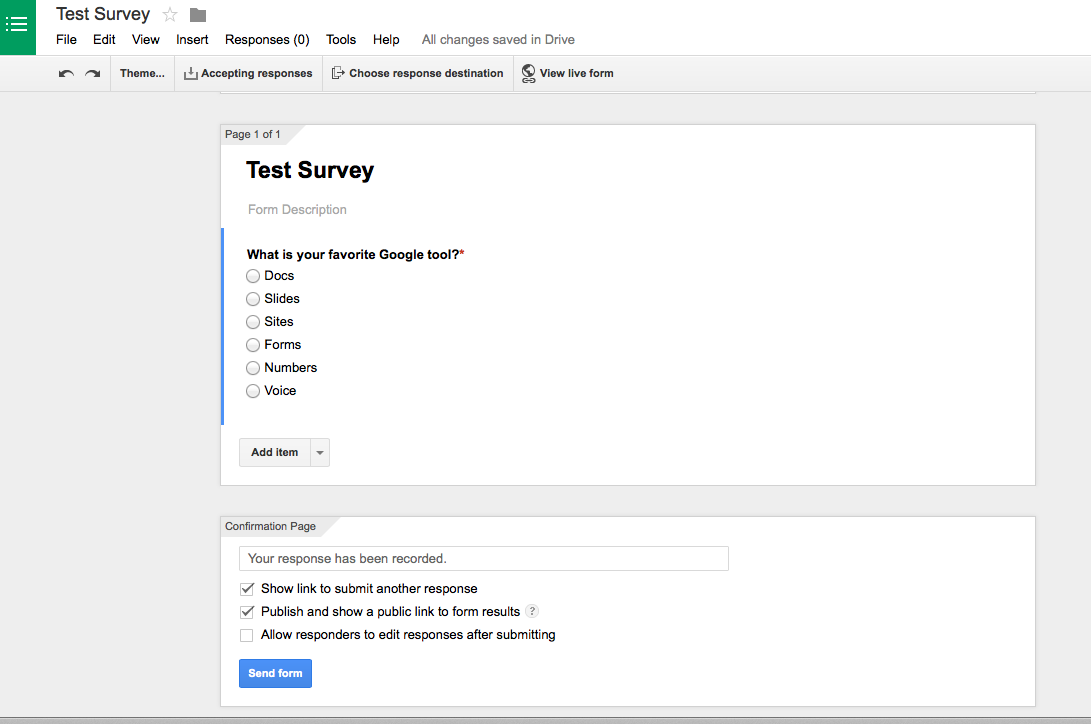
I worked with multiple choice for this tutorial.  Once you've added your choices, you have the option of making the question required.  *I usually make a "What is your name?" question required for my forms.  Then I know who answered what.  I learned that lesson really quickly. Once you have added the questions you want, click "Done."  


If you want to share your results with the responders, click "Publish and show a public link to form results."  You can also allow responders to edit their response after they submit.  You then have the option to view the live form.  If you click that, you will see what your form looks like.


The above is an example of my live question.  Responders choose their answer and hit submit.


After responders respond, they are met with this screen letting them know their response was recorded.  


At the top of the screen you will find the word "Responses"  When responses are recorded, the number in parentheses changes.  If you click responses, you are able to see the results of your form.

You can also view your responses by clicking "View Responses"  this will render the spreadsheet.  What I love most about the spreadsheet option is that it timestamps responses.  If you are running a contest, need an assignment turned in by a certain time, there are no excuses or arguments.


Sound off in the comments about how you would use Google Forms in your classroom this year!


Monday, August 11, 2014

Meet the Teacher Linky

I have my actual Meet the Teacher with my students in a week, but today, I'm linking up with Falling Into First for a virtual Meet the Teacher.


So, a little about me....I'm Shasta. I'm a recently turned 39, married 16 years wife to Cheney, momma to Taku the Jack Russell Terrier, and teacher of 14 years. I've taught grades 2-5, and even had a year as a Master Teacher/Coach last year.  I'm thankful to be headed into a class of 5th graders this year.  Out of all of my experiences, 5th grade is my absolute favorite to teach.


Cheney and I met in Alaska 17 years ago and have lived all across the US - Alaska, Seattle, Louisiana, South Carolina, and Tennessee.  Life has been an adventure for sure.  


A few of my favorite things:
The beach, Coastal South Carolina, Cannon Beach, Oregon, Sonic Cherry Coke, Cheeseburgers/Fries, Pizza, A good walk/run outside, books and more books, dogs, good naps, coffee all day long, pedicures, someone else washing my hair, binge watching Netflix.


IF YOU WEREN'T A TEACHER, WHAT WOULD YOU WANT TO BE?
I would love to be a travel writer for a magazine like Coastal Living.  Staying in posh hotels, reviewing the service, hanging out on the beach and exploring coastal towns.  Would love it.

THREE LITTLE WORDS THAT DESCRIBE YOU.
Driven, tender-hearted, guarded

FINISH THE SENTENCE, "________,  SAID NO TEACHER EVER!!"
I love writing report card comments, 

IT'S YOUR BIRTHDAY AND YOU CAN INVITE ANYONE {DEAD OR ALIVE} TO THE PARTY. WHO ARE YOU INVITING?

The Beatles, JFK, my grandparents, Heath Ledger, Jackie Kennedy

IF SOMEONE WROTE A BOOK ABOUT YOUR LIFE, WHAT WOULD BE THE TITLE?

How to be too nice

YOU GET TO PICK ONE SUPERPOWER. WHAT IS IT?

the ability to stay awake all the time

WHAT'S YOUR FAVORITE QUOTE OR SAYING?

“Not all of us can do great things. But we can do small things with great love.” 
― Mother Teresa

IF YOU HAD TO SING ONE SONG ON AMERICAN IDOL, WHAT WOULD IT BE? 

Hit Me With Your Best Shot - Pat Benatar
ARE YOU A MORNING PERSON OR A NIGHT OWL?

Night Owl for sure.  There have been MANY all nighters this summer. 

WHAT'S YOUR FAVORITE RESOURCE THAT YOU'VE CREATED IN YOUR TPT SHOP?

I haven't created any products yet :(

SHARE SOMETHING WE MIGHT NOT KNOW ABOUT YOU!

If I could live in any time period, I think it would be in the post WWII time period.  I love the fashions and there are just enough modern conveniences that life would be comfortable.  Give me a red lip and a swing dress any day with Victory Rolls in my hair.  


Can't the link to work on the image, so here is the link to Falling into First to meet other teacher bloggers. 

Tuesday, August 5, 2014

Google Apps...

This year my district has become a Google Education district.  I am so excited about the possibilities that are now available to me through Google.  So, as I learn how to navigate new pieces of Google, I want to share those with you during our Technology Tuesdays.

I've been playing with the apps of the summer and I have to say they are easier to navigate than anything else I've done.  Prior to Google, I used several different providers to accomplish everything that Google does.

Our district websites were hosted by a separate site, email was separate, storage of documents was either on my computer (learned the hard way that when your hard drive dies, so does your storage) or dropbox, pictures in Flickr, etc.  Now everything is in Google.  I've even started using Google Docs as opposed to Word because of the ease of dropping documents into my website.


Google is WAY more than just a search engine!  If you haven't explored, take a minute and do so.  The above pictures are just a SMALL sampling of all of the apps that are available.

How do I get started?
In order to embrace the full capability of Google, you will need to have a Google account.  I've been using Google for my email for years now, so if you have a gmail account, you are good.  If not, go ahead and sign up for one and you have all of these wonderful tools at your fingertips!

Over the next few weeks, I'll be highlighting one Google App and how I use it to make teaching easier.  I'll also provide a few tips and tricks to help you and your students manage Google in the classroom.

See you next week!

Monday, August 4, 2014

Monday Made It: August 4 Edition

August is here and that brings back to school madness!  I've spent the last few weeks getting things together at home so I could use my time wisely when I go into my class.  But, as always, no matter how much prep I do at home, it's always chaos when I return.  I thought it would be better this year because I didn't really have a lot to unpack, but judging by the pic below, that was not the case. After 14 years you would think I'd have it down to a science, but I don't.


I have a difficult time staying focused once I start the decorating/organizing phase.  I will work on one project or area until I get bored and then move to something else.  The result is a room that is a mess.

I'm linking up with 4th Grade Frolics for the August 4 edition of Monday Made It.  Time is ticking away on the August clock.


Our district uses Everyday Calendar Math.  Part of that program is a counting tape that you add to every day.  5th grade works with decimals.  Instead of hanging that tape at the top of the wall like I normally do and adding a post-it note each day, I used sentence strips and pre-wrote all of the numbers for all 180 days on post-its.  Then I laminated them.  I then covered them with post-it notes so now all we have to do is take a post-it note off of the strip.  The pic shows them partially covered with yellow sticky notes. I added purple ones to cover all of the numbers.  Now, there is no climbing, losing track of the days, or forgetting.  This will be in the hands of my students once routines are established.


I use exit tickets as a formative assessment at the end of many lessons.  Instead of having students place the notes on the edge of their desk and me taking them up, I wanted a central area where students put their note and it also doubled as a display of student work.  I used post-it notes and laminated the whole poster.  Next I numbered the post-it notes with a sharpie.  I'll now know which student doesn't turn in a sticky note.


I have to have a word wall up in my room that is a "living" document.  Normally I place this at the front of the room, but it is cumbersome with the Promethean board, so I moved it to the back.  I used paper plates and letters this year to add a little pop.


Next week will be my last week of Monday Made It as we go back to school on the 12th.  Hopefully, my room will be finished and I can show you the rest of the things that were made.  Everything is in progress right now! Can't wait to have my table back.

Head over to 4th Grade Frolics and see what everyone else made this week!

Sunday, August 3, 2014

August....Yikes!

Hard to believe that it is already August 3rd!  I had great plans for this summer - remodeling my husband's grandmother's house.  We have tediously worked slowly and there has been progress, but we've only partially painted one room and the living room is still stocked with boxes.

It's time for Currently, though, so let's get on with it.


Listening:  My routine has been relaxing this summer to say the least.  Morning coffee, watch a bit hours of Netflix, go to lunch with my husband, and then come back to work a little on the house.  So, after watching the entire seasons of Dawson's Creek and Gossip Girl, I've been watching favorite movies.  Today is "The Devil Wears Prada."

Loving: I am so excited to get the new year started.  After a terrible experience last year, I'm thankful to return to the classroom with a group of students and in a building with phenomenal teachers who are all positive, willing to do anything for anyone, and work their fannies off.  I'm ready!

Thinking:  There are a ton of things I could and should do to speed this renovation along, but honestly, I don't feel like it yet.  I spent last night cleaning 8 solid wood doors. 4 of them were louvered closet doors and my fingers are still hurting from getting into each little slat to get 60 years of dirt and grime off of them.

Wanting:  I need the house to take care of itself.  Our goal was to have everything done by the 28th of July.  Didn't happen.  After 15 trips to the dump and Goodwill, we still aren't finished with emptying out grandma's stuff and moving ours in.  We've just started painting and it's taking forever!

Needing:  South Carolina gifts teachers across the state with $250 and I need it to get here.  I have a list of things I need to do, but need the money to buy supplies.

First Day is coming soon.  I can't wait for it to get here.

Go visit Oh, Boy 4th Grade with Farley and check out what everyone else is up to today!


I Don't Have the Answers...

It's taken me all weekend to begin to process what happened in Parkland, Florida.  I put it aside and compartmentalized it until I...